
5 minute read
- In virtual training and meetings, people who cannot be seen clearly cannot be understood as well.
- Present yourself on virtual calls as you would in a physical meeting: be clearly visible, camera on, and actively present to enable real participation.
- Invest in a good-quality external camera, proper front lighting, and a separate microphone so others can clearly see and hear you in virtual meetings.
- If you use blur or a virtual background, position yourself with a wall behind you so your image remains clear and non-distracting.
Im teaching 5 Professional Scrum classes this month and I am surprised that, 22 months after Covid, I still see shadows, up nostrils, half-heads, and blank screens.
If we can’t see each other clearly then we cant understand each other as well. I will often read the room for breaks, focus, understanding, and disagreement. I can only read those that I can see, and that knowledge shapes the content that I deliver. If you want a class that is engaging and not boring then participation is key and the first step is presence!
If you are in leadership then it is doubly essential that you demonstrate the level of participation that you would expect others to present.
I would be very surprised if went to a physical meeting room and:
- Sat on the floor with only the top half of your head visible (the short-arse)
- Put your head on the table so I could only see the top of your head (the baldie)
- Leaned all the way back in the chair and looked at the roof (the nostril)
- Were contained within a cardboard box with only your legs poking out the bottom (the no-camera)
If you think that those methods of participation would be disrespectful in a physical meeting, why would you think it’s ok in virtual?
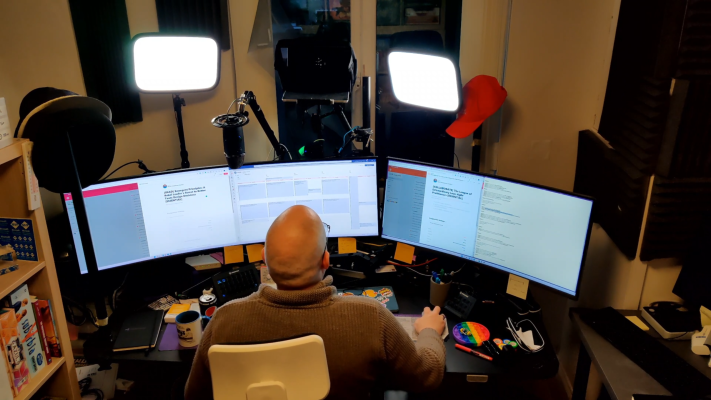
We all spend a lot of time on video calls and I for one want to keep working from home. As part of human communication, 70-93% of our queues about others are non-verbal. Think about how you present yourself visually on a call just as you would in a meeting room sitting across from us. What do I expect:
- To be able to see you, preferably from the waist up to maximise body language.
- Not to be looking up your nose, at your forehead, or to only be able to see the top half of your head.
- To be able to hear you clearly
In order to achieve that well, and maintain the WFH life many of us have come to appreciate I would like you to consider:
- Camera £175 - Having a high-quality camera is important. Usually, the ones on your laptop, especially if it is a cheap one, is not going to cut it. I recommend the Elgato Facecam. If you are a little more tech-savvy you can use an old phone (they usually have awesome cameras) and the NDI application to stream its video to your computer. If you need help please contact me.
I use an Elgato Facecam: Don’t skimp here, it is essential to have a high-quality camera that balances the light well.
- Lighting £20 - Wow is this important! Make sure that you don’t have a light behind you that renders you in shadow, and get a face light if possible. I live in Scotland and in the winter it’s only light between 1000-1400.. the rest of the time I need front lights for you to be able to see me well. If you do need and get lights then make sure that you can control the tone and intensity of the light. It can get very tiring to have the same bright lighting you all the time.
I use Elgato Key light, but there are many very cheap options on Amazon. Even a simple ring light will be better than nothing. I got 2 studio defused lights and a greenscreen for £40 on Amazon basics.
- Microphone £80 - Have a decent microphone that is not attached to your laptop. Laptop keyboards transmit every sound, like typing, and are generally of poor quality. Investing in a good microphone can make all the difference. I recommend an Elgato Wave!
I use a Yeti Blue Microphone, but I recommend Elgato Wave: Don’t skimp here, this is essential.
- Background - This is one where we might be limited due to our home situation. If you are going to use a blur or virtual background I recommend having a wall behind you.
I don’t use a virtual background: You can ask about what’s on my wall behind me, it’s a good icebreaker. I do also have an Elgato wall-mounted greenscreen but it’s a luxury and unnecessary for most, but lots of fun.
- Cloaths - Ware what you want! Got you! You were expecting me to say to wear a suit or a shirt! Haha no, wear what you want and feel comfortable. I allocate no sigma to jammies, dressing gowns, or any other options. I’ve seen it all and as long as you are comfortable and not making others unreasonably uncomfortable you can wear what you want.
Im a slacks and polo kind of guy, last time I wore a tie was in 2010, except for the poor choice to spend 3 months consulting for a company that would never change in London a few years ago. What I learned! If a company has a dress code… I’m out.
Conclusion
If we can’t see you we cant understand each other as well. I use those that I can see and hear to read the room and to shape and control the content of my training, workshops, and meetings.
Subscribe to Martin's articles
Writing since 2006
Articles, usually weekly on Mondays. One click to leave.
Enjoyed this? One click, no account.
Questions this answers
How should I set up my camera, lighting, microphone, background, and clothing for engaging online meetings or virtual classes?
Use a high‑quality external camera positioned so you’re clearly visible (ideally from the waist up), with front-facing adjustable lighting that avoids backlight and shadows, and a separate decent microphone so you can be heard clearly without keyboard noise. Choose a background that isn’t distracting (a real wall is fine; a virtual background works best with a wall behind you), and wear whatever makes you comfortable as long as it doesn’t make others unreasonably uncomfortable. Being clearly seen and heard allows others to read your non‑verbal cues and keeps classes and meetings engaging.